Harris · the AI operator for small-business owners on Windows
An AI that remembers your business. And an install you can see before you buy.
Harris runs on your own PC, on your own Claude plan, and keeps everything it learns in notes you can read. Every buyer gets a step-by-step onboarding portal, with a short film for every step, from payment to Harris greeting you by name. Here's a look inside.
What Harris is
You already pay for an AI. It starts from zero every time.
Every session, you explain the business again: the priorities, the people, what you decided last week. Harris is built the other way round. It keeps your whole business in a folder of plain notes on your PC, reads them every morning, and picks up where you left off.
It tracks what's open and overdue.
Your priorities, follow-ups and deadlines live in your notes. Harris reads them every morning and tells you what needs you.
It builds and runs systems from a written brief.
Describe the job in plain English. Harris builds it, runs it, and says what it checked.
It asks first.
Anything with real-world effect waits for your yes.
It turns every mistake into a rule.
We call it the Scar Rule: every failure becomes a written rule, and the rules never lapse.
It comes with a console, a voice, and modules you can add when you want them.
One afternoon, Monday 12 October 2026
- 13:30spec handed over
- 16:00:00first public post, on schedule
- 3channels posting on their own by nightfall
- 54automated tests passing
Thomas Scott set Harris up on 16 August 2026 to run his own businesses, and it has started every day knowing them since.
Inside the portal
Most sales end at the payment. Here's a look at what happens after yours.
Every buyer gets a private onboarding portal: one step at a time, a short film for every step, and a page that remembers where you got to. Here's a preview. The rest unlocks with your install.
-
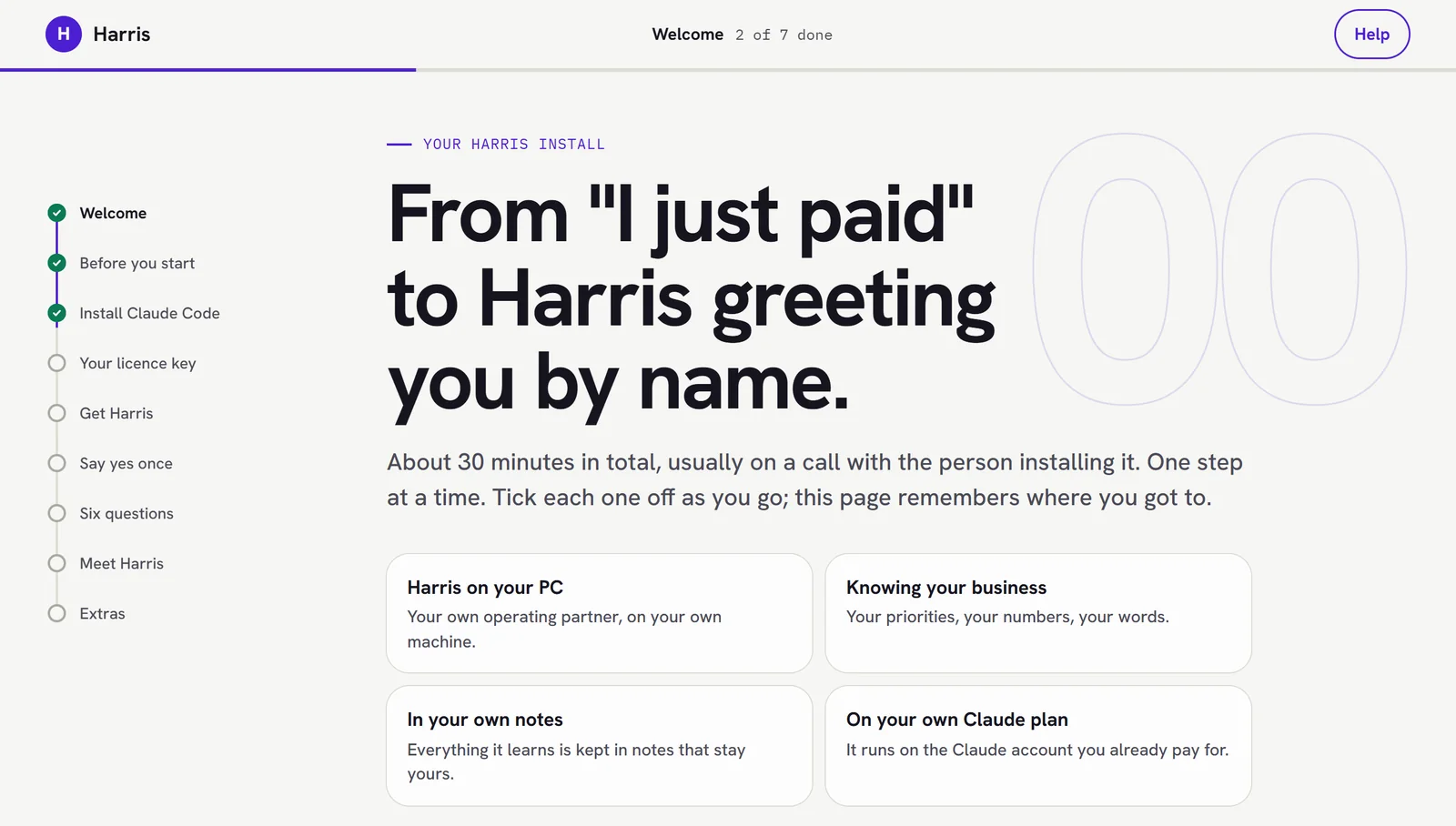 Welcome
About 30 minutes, usually on a call with the person installing it. One step at a time, and the page remembers where you got to. No GitHub account. No coding.
-
Step 3 · Your licence key
A short film for every step, with captions and a transcript. Here: your licence key goes in a hidden box and is kept in Windows' own password store. Never in a chat.
-
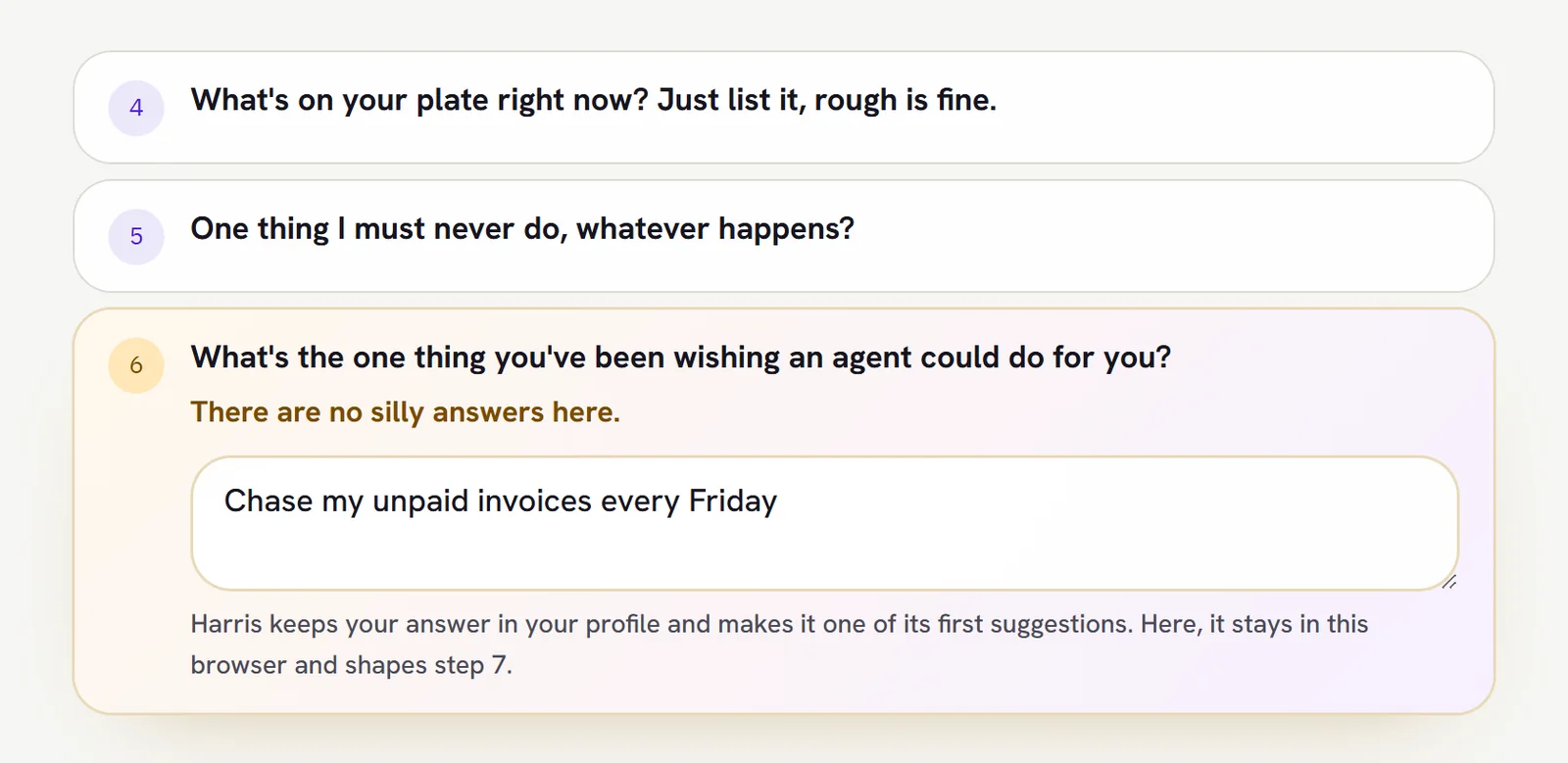 Step 6 · Six questions
Six questions, about five minutes. The last one: what have you been wishing an agent could do for you?
-
Step 7 · Meet Harris
Then Harris shows you what it can become, explains what it is and what it can't do, and asks about you before you give it a single job.


The rest unlocks with your install.
-
Activate now
One click gives Harris the exact words to set up voice, phone, calendar and more, with you.
Unlocks with your install -
Extras
Voice, phone and meetings, calendar and important email, weekly review, the skills pack, agents, tools and apps. Each says what it needs.
Unlocks with your install -
Advanced setup
Choose your parts, where your notes live, Claude Code or Codex, Harris's name and personality, and voice customisation.
Unlocks with your install

The films
30 short films, one for every step, with captions and a transcript underneath.
A world of possibilities 1:21
What a Harris can become.
Transcript
You've set Harris up. Here's what it can become.
Each morning, a brief: what's overdue, what's due, and who needs you.
It remembers your business, in plain notes you can read.
It drafts the replies. Nothing goes out until you say so.
Record a meeting on your phone. It's transcribed, summarised and filed.
Hold to talk, and hear it answer.
Ask for an automation in plain words. Harris builds it, step by step, and tries it on an example first.
It plans your posts across your channels, and drafts the captions. Nothing posts without your OK.
It scripts, captions and cuts your videos.
It builds decks you scroll through, and websites, in three versions, so you choose.
Even small apps of your own.
Every Monday, a review of your week. Recommendations, never actions.
And agents keep working in the background, while you get on.
For a whole team, there's Sprea: one brain for teams and companies.
Start small. It grows with you.
Get Harris 0:42
Transcript
Step four. Download Get Harris. It's one small file. Open your Downloads folder, and double-click it.
Windows may show a blue box that says, "Windows protected your PC". That's normal for a file that isn't from the Microsoft Store. Click "More info", then "Run anyway".
Get Harris then does six things, in order. It explains what it's about to do. It adds Git, if it's missing, after asking you. It asks for your licence key, in a hidden box. It downloads Harris. It checks the download is signed by us, and refuses if it isn't. Then it runs the easy installer.
On screen: the Windows warning, the Downloads folder and the Get Harris window are labelled examples. The Get Harris window shows the real wording of the current Get Harris file, on a PC that does not have Git yet.
Say yes once 0:34
Transcript
Step five. Say yes once. The Harris installer shows one short screen that sums up everything Harris will be able to do on your PC.
It lists what Harris can read, what it can change, and what it connects to. It says what runs in the background, and whether anything can spend money. And it all runs on your PC, as you.
Want every detail? Press D for the full list. When you're happy, press Enter to say yes. You only do this once.
On screen: every window shown is a labelled example, rebuilt from the real screen and its real words.
Meet Harris 0:39
Transcript
Step seven. Meet Harris. Once your answers are saved, Harris greets you by name, with your priorities.
Before you give it a single job, it explains itself. It lives on your PC. Its memory is your notes folder, and you can read every line. It asks before anything with a real-world effect. And it tells you plainly what it can't do.
Then it asks a few open questions, to get to know you, and suggests three first things to ask. Like: what should I focus on today?
The Harris shortcut on your desktop opens the console.
On screen: every window shown is a labelled example, rebuilt from the real screen and its real words.
Stuck at any step? Reply to the email your licence key came in, or book the install call.
The offer
The install: £2,500, done with you on a call.
What's included
- Your business loaded into your notes: your offers, priorities and rules.
- The console and voice running on your PC.
- Two of the tools you already use, connected.
- The video system (films and Shorts built in code) and the deck system (interactive web decks plus PDF), set up and configured to your brand.
- One system you've been putting off, built in the session.
- 30 days of help afterwards.
Install £2,500
Book a 30-minute fit callBonus
Included with your install: the Skills pack (bonus)
29 reviewed skills that teach your agent to do specialist work well. Optional, and nothing installs without your yes.
Ten are our own, written for the pack. Harris copies them in when you say yes:
- scroll-journey-deck any deck as an interactive scroll-through web page, plus a PDF.
- web-motion-stack smooth scrolling and scroll-driven animation for websites.
- sound-pass sound design and mastering for a finished film.
- spatial-type the "words standing in the room" video look.
- paper-explainer-short a faceless explainer Short on halftone paper.
- video-storytelling-storylocks six storytelling techniques that keep people watching.
- video-audience-obsession a three-level framework for building repeat viewers.
- video-content-psychology eight principles for trust and attention in scripts, titles and thumbnails.
- search-engine-setup register a live website with Google and Bing, verified by DNS, with its sitemap submitted.
- using-lovable decide whether a build belongs in Lovable, and keep credit spend predictable.
The other 19 come from their own publishers, and Harris shows you each one's own page and install command: Anthropic's frontend-design, claude-api, Claude in Chrome (two skills), update-config, artifact-design and sales outreach; the open-source Superpowers set (seven skills, from brainstorming and plans to test-driven development and systematic debugging); HyperFrames, general-video and talking-head-recut from HeyGen; ui-ux-pro-max; and a marketing playbook (jaredrhod-marketing).
Care plan: £400 a month, optional.
After your 30 days: every improvement to Thomas's own setup installed on yours, one new module or automation a month, and a monthly call with Thomas. No contract. Stop any month.
Paid to others, not us
Your own Claude plan (Pro is $20 a month; heavy daily use usually needs Max at $100 or $200 a month), and ElevenLabs if you want a natural voice (Starter is about $6 a month). No per-seat fee.
How it works
- 1
A 30-minute fit call with Thomas on Google Meet.
- 2
A straight answer. If it's a fit, the bill and a booked install. If not, you're told on the call, before you pay anything.
- 3
The install session, on a call.
- 4
30 days of help, then the optional care plan.
Why show you the onboarding before you buy?
Because the hard part of buying something like this is not knowing what happens after you pay. Now you've seen it. And if it looks like more than you want to take on, that's worth knowing before the call, not after.
Who it's for
Who it's for, and who it isn't.
For
Owners of a small agency or consultancy, or founders running two to five ventures. One to ten people. Already paying for Claude or ChatGPT and tired of it starting from zero. On Windows, and happy to follow a few terminal steps with help on a call.
Not for
Mac users (there's no Mac version yet). Anyone who wants a phone app with no set-up. Enterprises: that's what Sprea is for. Anyone after a magic button.
Questions
Does it work on a Mac?
No. Harris is Windows only for now: Windows 10 or 11.
Do I need to be technical?
No coding and no GitHub account. You follow a few terminal steps, usually on the call with the person installing it, and the portal has a short film for every step.
What else will I pay for?
Your own Claude plan, paid to Anthropic: Pro is $20 a month, and heavy daily use usually needs Max at $100 or $200 a month. ElevenLabs is optional, for a natural speaking voice. There is no per-seat fee.
Where does my data live?
Your notes, settings and keys stay on your PC, not on a server of ours, and the console listens only on your own computer. Harris runs on Claude, so the work it does is sent to Anthropic, as when you use Claude yourself.
Is it a sandbox?
No. It runs with your Windows permissions, through Claude Code's permission prompts. Don't run it on a shared Windows account or a machine you don't control.
Will you make my films and decks for me?
The install sets up the video and deck systems and configures them to your brand, so you can make your own with Harris. If you want help with a first one, ask on the fit call.
What happens if I stop the care plan?
Updates stop. Everything already on your PC keeps working, and your notes stay yours.
Is it for my team?
Harris is for one owner on one PC. For teams and companies, that's what Sprea is for.
How long does setup take?
About 30 minutes for the steps in the portal, usually on a call with the person installing it.
P.S.
P.S. You don't have to take our word for any of this. Watch the films above, then book the call and ask anything. If it isn't a fit, you're told on the call, before you pay anything.